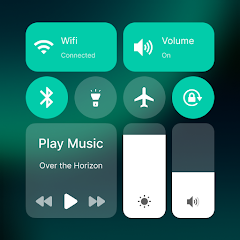
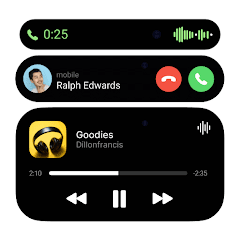
Ever thought about giving your mobile device a serious makeover? Say hello to Control Center Mi 13 Style, the app that not only beautifies but also supercharges your command center with tons of customization options that make it uniquely yours. From color palettes to seamless functionality, this is where control meets creativity!
The standout feature that makes Control Center Mi 13 Style oh-so-appealing is its incredible customization capabilities. You have the power to tailor your command center, shaping both its appearance and user experience based on what suits you best. Want a sleek dark mode or a vibrant explosion of colors? How about rearranging those pesky shortcuts? With this app, you're in the driver's seat, directing your mobile experience just the way you like it.
Another major perk of this app is the effective accessibility features that come into play. When you grant permission for the app to use ACCESSIBILITY_SERVICE, you'll unlock an overlay window right on your lock screen. Imagine having all the critical features at your fingertips – taking screenshots, locking your screen, or suddenly calling up your power menu – without juggling through apps! It’s like having your very own digital assistant available at a moment's notice. And the cherry on top? These features don’t disrupt your flow; they enhance it!
Are you a music junkie who can’t bear to be without headphones? Look no further! Control Center Mi 13 Style dives headfirst into Bluetooth technology to create a secure connection with your wireless earbuds or speakers. Whether you’re jamming out to your favorite tunes or catching up on a podcast during your commute, everything you love is connected seamlessly. Talk about multitasking at its finest!
Let’s break down some essential features that make Control Center Mi 13 Style an absolute must-have:
Foreground Service Permission
To keep this powerhouse functioning smoothly, especially on Android 12 and later, the app relies on a foreground service. This ensures that your shiny overlay remains active, allowing access whenever you swipe down from the top of the screen.
Accessibility Service
Picture the ease of controlling locks and taking screenshots - thanks to the Accessibility Service, all this is within arm's reach.
Notification Reading
Stay in the loop effortlessly, as this app lets you read notifications directly on your lock screen. Forget about constantly unlocking your phone just to see if there are new updates waiting for you!
Bluetooth Connection
Connect seamlessly to any wireless audio devices with the necessary Bluetooth permissions.
Friendly Feedback
Remember, if you encounter any hiccups while using this app, just give them a shout-out. They’ll gladly take care of it!
In a world that moves faster than a caffeinated squirrel, efficiency is the name of the game. The Control Center Mi 13 Style equips you with several functionalities that help you work smarter—not harder. By personalizing your setup with shortcuts and settings you use the most, everything becomes one effortless swipe away. Simple things like adjusting screen brightness or toggling Wi-Fi no longer require searching through menus. Just pull down that customizable control panel and voilà!
So, how do you stay up-to-date without constantly checking your phone? With the READ_NOTIFICATION access granted, this enhanced Control Center puts media controls and notifications straight onto your lock screen. It allows you to catch up on important alerts without ever needing to unlock your device. Relax and let the app do the informative heavy lifting for you.
In conclusion, Control Center Mi 13 Style is your go-to solution for transforming your mobile experience. With extensive customization, unbeatable accessibility features, and a splash of Bluetooth magic, your command center will not just look good; it'll operate like a charm. It's all about enjoying modern technology while making it work for you. So why wait? Enhance your smartphone game today!
| App Name | Control Center modern M Style |
|---|---|
| Version | 1.75 |
| Size | 18.37 MB |
| Update | Jun 08, 2025 |
| Developer | Jalan |
| Category | Personalization |
| Google Play ID | com.jalan.control.center.mi13 |
Control Center modern M Style 1.75
Control Center modern M Style 1.75
Control Center modern M Style 1.70